-TLgmZcK1heam1n69RVEGBCFlYidxUF.jpeg&w=128&q=75)
Hot data still needs fast indexes. Cold data needs cheap columnar storage. The future database needs both.
For a long time, databases were built around a pretty simple assumption:
Keep the data inside the database, index it, and make queries fast.
That model worked really well when applications had smaller datasets, storage was expensive, and most systems only cared about the latest operational state.
But modern applications are different.
They generate events, logs, files, messages, user activity, analytics data, embeddings, audit trails, historical snapshots, and now increasingly huge amounts of AI-generated content. Modern AI systems produce not only final outputs, but also tool-calling traces, reasoning logs, agent workflows, intermediate results, retrieval context, evaluation data, conversation histories, and many other artifacts that companies may want to keep for debugging, compliance, analytics, personalization, or future model improvements.
Honestly, the amount of AI-related data can sometimes become bigger than the actual application data itself.
Some of this data must be very fast.
Some of it only needs to be cheap, durable, and queryable when needed.
In my view, as systems grow, teams often find themselves leaning toward one of three architectural approaches.
The first is the traditional approach that many of us have used for years.
The second is the common modern approach of combining multiple databases, each serving a different type of workload.
The third is a newer approach that treats hot and cold data differently from day one.
As CTO of NAZDAQ, I have seen this challenge repeatedly across organizations scaling their operational and analytical systems. In many cases, the solution is not simply adding more database capacity, but implementing a data synchronization and lifecycle strategy that keeps operational workloads fast while making historical and analytical data accessible where it is needed. This is one of the reasons solutions such as NAZDAQ's CloudSuite Data Sync have become increasingly important.
A common evolution often looks like this:
- Start with one database.
- Data grows.
- Add an in-memory cache.
- Add read replicas.
- Partition tables.
- Maybe shard tables to distribute load and storage.
- Add specialized databases for search, documents, vectors, or analytics.
- Clean historical data or move it into an archive to keep operational datasets small.
- Replicate data into object storage or a warehouse for analytics.
- Continue scaling each layer independently.
It works. In fact, many successful companies still run this way today.
But there are now multiple valid paths, and I think it is worth looking at them side by side.
Three Architectural Approaches We Will Explore in This Article
In this article, I will walk through three common ways teams build and scale modern data systems, examining the strengths, trade-offs, and challenges of each approach as data volumes and application requirements grow.
Option 1: Keep Everything in One Relational Database
This is the most traditional approach.
In this model, the relational database is the center of everything. Application data, historical data, and most operational queries all remain in the same system for as long as possible.
As traffic grows, you usually add supporting systems around it.
-FMKdPCKuW4BtltDzFyJcULxH99EsN3.png)
This approach is easy to understand and easy to start with.
A relational database gives you transactions, consistency, mature tooling, SQL, backups, operational familiarity, and strong developer productivity.
This is still the default choice for many systems, and honestly there is nothing wrong with it.
Option 2: Use Multiple Databases for Different Workloads
The second approach is what many teams eventually move toward.
Instead of forcing one relational database to do everything, different databases are introduced for different needs.
For example:
- a relational database for transactional data
- a document database for flexible records
- a search engine for full-text search
- a key-value store or Redis for caching
- a vector database or vector index for embeddings
- a warehouse or analytical system for reporting
It often looks something like this:

This approach is sometimes called polyglot persistence.
The main idea is simple: use the right database for the right job.
That can work very well.
It allows each workload to use a storage engine that fits its access pattern better.
But it also introduces new complexity.
Now you need to think about synchronization, consistency between systems, duplicate data pipelines, operational overhead, multiple query models, multiple backup strategies, and more integration work between databases.
Option 3: Keep Only Hot Data Hot
The third approach starts with a different assumption:
Not all data deserves to stay in operational storage forever.

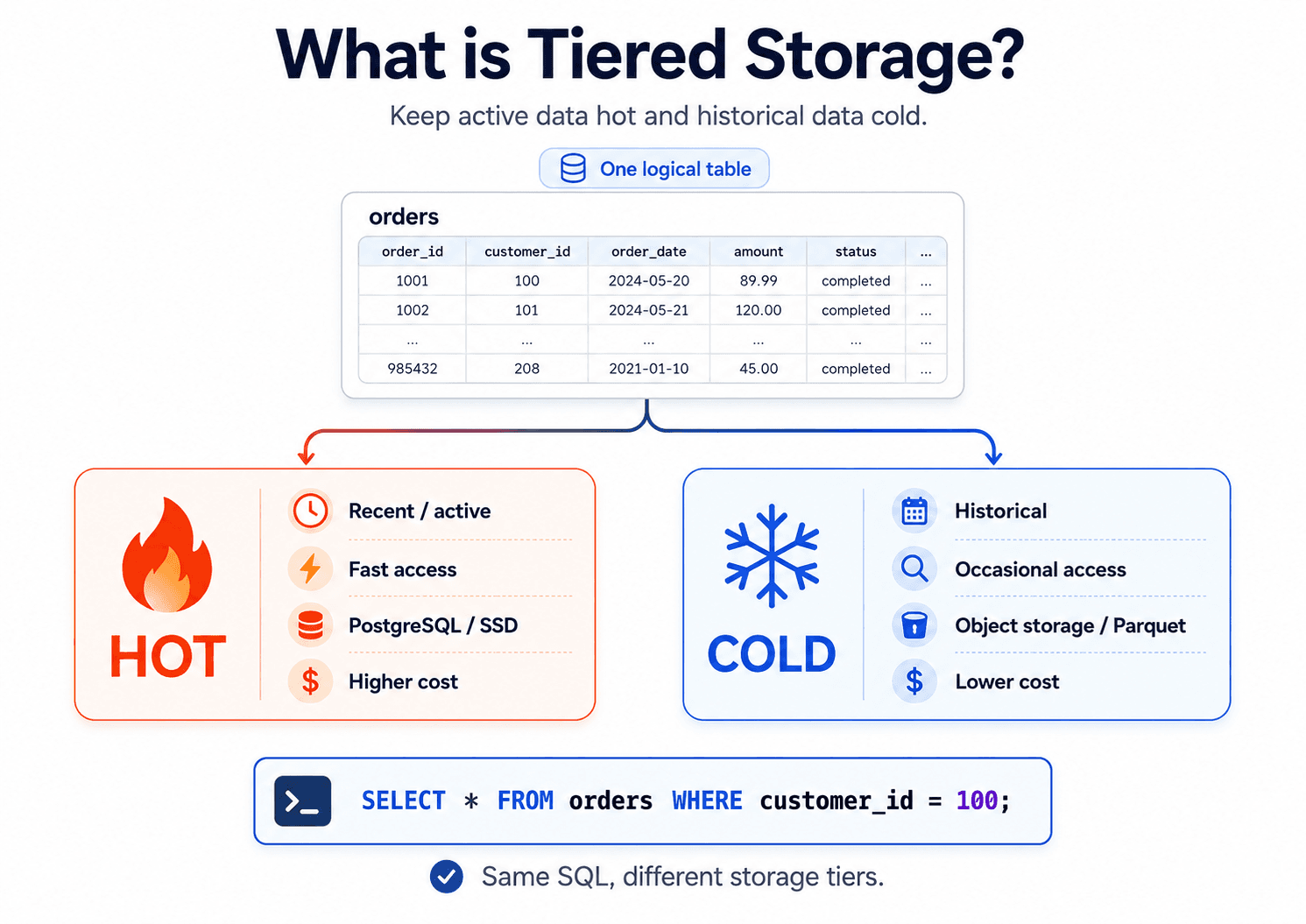
Recent and active data stays in the database.
Historical data gets archived into cheap columnar storage such as Parquet files on object storage.
The database remains smaller and focused on operational workloads.
Historical data is still queryable without occupying expensive hot storage.
To be clear, this pattern can be implemented with almost any database today. Many teams already build custom archival pipelines that move older data into object storage, data lakes, or analytical systems while keeping recent data in their operational database.
The challenge is that most traditional databases do not provide this behavior natively. Developers typically need to write their own application logic, background jobs, retention policies, synchronization processes, query routing, and retrieval mechanisms to make hot and cold data work together seamlessly.
This is one of the areas where KalamDB aims to be different. Instead of treating hot and cold storage as separate systems that developers must manually coordinate, the goal is to make data lifecycle management a native capability of the database itself. Hot data can remain in fast operational storage, while historical data can be automatically archived into columnar formats on object storage and still remain accessible through SQL.
This is the model I find especially interesting today because it aligns with where many systems appear to be heading.
Comparing the Three Approaches
Option 1: One Relational Database
Pros | Cons |
|---|---|
Very simple to start with | Database grows continuously |
Strong transactional guarantees | Indexes become very large |
Mature tooling and SQL ecosystem | Backups become larger and slower |
Familiar to most teams | Compaction and maintenance become more expensive |
Easy operational model early on | Often requires adding caches and replicas later |
Historical data stays directly available | Analytics usually requires replication into another system |
Good developer productivity | Eventually multiple supporting systems still appear |
Option 2: Multiple Databases for Different Workloads
Pros | Cons |
|---|---|
Each workload can use the best-fit database | Higher operational complexity |
Good fit for diverse data types | Data synchronization becomes harder |
Better flexibility for search, documents, vectors, etc | Consistency between systems becomes more difficult |
Can improve performance for specialized workloads | Teams need expertise across multiple systems |
Often a practical step for growing platforms | Querying across systems becomes harder |
Lets teams scale different services independently | More moving parts, backup policies, and failure modes |
Useful when application needs are already very diverse | Can create silos between operational and analytical data |
This architecture is very common today.
And to be clear, it is not a bad architecture.
For many companies, it is the most practical way to scale beyond a single relational system.
But it also tends to increase the number of systems that developers and operators need to understand.
Option 3: Hot/Cold Data Architecture
Pros | Cons |
|---|---|
Smaller indexes from day one | Requires lifecycle management |
Lower operational database costs | More architectural planning upfront |
Faster operational queries | Historical queries may be slower |
Better separation between operational and analytical workloads | Requires archive and retrieval mechanisms |
Object storage costs are significantly lower | Teams must understand multiple storage layers |
Easier long-term scaling | More moving parts initially |
Historical data remains queryable | Not every workload benefits equally |
Designed for growth from the beginning | Requires good tooling and automation |
The biggest advantage, at least in my opinion, is that you are preparing for scale from the start instead of continuously adding new systems later.
Hot Data Should Stay Small and Fast
Hot data is the data your application needs right now.
For example:
SELECT * FROM orders WHERE status = 'pending'; SELECT * FROM messagesWHERE room_id = 42ORDER BY created_at DESCLIMIT 50; SELECT * FROM users WHERE id = 123;This data needs low latency.
It needs fast indexes.
It may power APIs, dashboards, real-time subscriptions, user sessions, and application screens.
But if we keep everything in the hot layer forever, eventually the hot layer becomes heavy.
Indexes grow.
Compaction becomes more expensive.
Backups become larger.
Queries touch more metadata.
Operational costs increase.
A shorter index is usually a faster index.
So one of the simplest ways to make hot storage faster is not only optimizing the storage engine itself, but reducing what the storage engine actually needs to keep hot.
Keep recent and active data in fast storage.
Move old, inactive, or analytical data somewhere else.
Sounds simple, but it has a surprisingly big impact.
Cold Data Is Not Dead Data
Cold data is not useless data.
It just has a different access pattern.
Examples:
- old user activity
- archived messages
- historical orders
- logs
- analytical snapshots
- embeddings
- columnar datasets
This data may still be extremely valuable.
But it does not need to sit inside the most expensive and latency-sensitive part of the database forever.
This is why object storage and columnar formats are becoming more important.
Object storage gives us cheap, durable, distributed storage.
Columnar formats like Parquet give us efficient scans, compression, and much better performance for analytical queries.
Together, they are changing the shape of the database.
Instead of saying:
The database owns all data forever.
Newer systems are moving toward:
The database manages hot data directly, and cold data lives in open storage that can still be queried.
This is actually a pretty big shift if you think about it.
Object Storage Is Becoming a Database Building Block
Colin Breck's post "Predicting the Future of Distributed Systems" makes a very important point:
Object storage is no longer just a place for backups, archives, or batch data.
It is becoming a core building block for distributed systems.
The reason is simple.
Object storage is mature, durable, widely available, and relatively cheap.
It also gives systems a common storage layer that can be shared across services, clouds, and tools.
That does not mean every query should directly hit object storage.
That would be way too slow for many operational workloads.
The smarter pattern looks more like this:
Example: AI agent conversations for a specific userUser: Sarah (user_id = 123)
Hot path: Keep the latest 10 conversations in fast storage active indexes on user_id and conversation_id low-latency reads and writes immediate access for the AI agent and application
Example: Conversation #91 (today) Conversation #90 ... Conversation #82
Cold path: Older conversations (#81 and earlier) compressed Parquet files object storage archived conversation history cheaper long-term storage
Example: Conversation #81 Conversation #80 ... Conversation #1
Query layer: hides the complexity from developers
Example query:
SELECT * FROM conversations WHERE user_id = 123;$0The system automatically reads recent conversations from hot storage and older conversations from compressed columnar files in object storage without the application needing to know where the data lives.
This is probably the most important lesson.
Object storage is not replacing every part of the database.
It is becoming the durable and scalable foundation behind many systems.
The database still needs caching, indexing, metadata, query planning, and execution.
But the storage foundation is changing.
The Database Is Becoming a Coordinator
In older architectures, the database was basically the box where all important data lived.
In newer architectures, the database increasingly becomes a coordinator across multiple storage layers.
One layer is optimized for fast operational access.
Another layer is optimized for cheap, durable, long-term storage.
Another layer may be optimized for analytical scans.
Another may hold files, vectors, or columnar data.
The developer should not need to care where every byte lives.
They should still be able to write:
SELECT * FROM user_eventsWHERE user_id = 123;The system can decide:
- recent events come from hot storage
- older events come from Parquet/object storage
- metadata comes from the database
- large payloads come from files
- vector data can live near the historical dataset
This is where the architecture becomes powerful.
Not because it uses more technologies.
But because it uses each storage type for what it is actually good at.
Why This Solves Multiple Problems
In Arabic, we say:
killing two birds with one stone.
That is what hot/cold storage can do when designed properly.
In reality, it often solves far more than two problems at once.
1. Faster Operational Databases
When historical data leaves the hot path, indexes become smaller.
Smaller indexes are easier to keep in memory, faster to scan, and cheaper to maintain.
2. Lower Storage Costs
Object storage is dramatically cheaper than keeping years of historical data inside operational databases. Columnar formats such as Parquet also compress data extremely well, often reducing storage size significantly compared to keeping the same data in hot operational storage.
3. Better Analytics
Historical data naturally fits columnar formats such as Parquet.
Analytical workloads become more efficient without impacting operational traffic, and most modern analytics tools already support these columnar formats natively.
4. Simpler Scaling
Instead of continuously adding caches, replicas, and specialized systems later, the architecture is already prepared for growth.
5. Better Separation of Concerns
Operational workloads stay operational.
Analytical workloads stay analytical.
Each storage layer focuses on what it does best.
This Pattern Is Already Showing Up in Successful Systems
This direction is not only theoretical.
Some successful modern databases are already moving toward architectures where local disk is no longer the center of the system.
ClickHouse Cloud is one example.
ClickHouse has been moving toward separation of storage and compute.
In this model, object storage can hold shared table data, while compute nodes can scale more independently.
Neon is another strong example.
Neon separates Postgres compute from storage.
Its architecture uses object storage as the durable long-term layer, while keeping latency-sensitive work close to compute using RAM, local NVMe, and pageservers.
That teaches a very important lesson:
Object storage is excellent for durability, scale, and cost — but the hot query path still needs smart serving layers.
So the future is not:
Put everything directly on S3 and hope queries are fast.
The better architecture is:
Use object storage as the durable foundation.
Use hot storage and cache for low latency.
Use columnar formats for analytical scans.
Use SQL to hide the complexity from developers.
Why Apache DataFusion Matters for KalamDB
KalamDB uses Apache DataFusion as its query engine to provide a unified SQL layer across both hot and cold storage.
DataFusion is a Rust-based query engine built around Apache Arrow.
It supports SQL, DataFrame APIs, Parquet, CSV, JSON, Avro, object-store access, query optimization, and extension points.
This fits naturally with KalamDB's architecture, where hot data lives in RocksDB and historical data is archived into Parquet files.
From a developer's perspective, there is no need to query different storage systems separately. You simply write a SQL query, and KalamDB automatically determines where the data lives and how to retrieve it.
A query may read:
- only hot data from RocksDB
- only cold data from Parquet files
- a combination of both hot and cold data
- indexes and embeddings alongside stored records
DataFusion provides the execution and optimization layer that allows KalamDB to unify these sources into a single query result.
This allows KalamDB to focus on:
- hot operational storage
- real-time SQL subscriptions
- metadata management
- data movement between hot and cold tiers
- developer experience
While DataFusion handles query planning, optimization, and execution across the different storage layers.
Personally, I think this is one of the reasons DataFusion has become so interesting recently.
This Is Not Only About Analytics
Hot/cold architecture is often discussed as an analytics pattern.
But it is becoming useful for operational systems too.
Imagine a chat application.
Recent messages need to be fast:
SELECT * FROM messagesWHERE room_id = 10ORDER BY created_at DESCLIMIT 50;But messages from three years ago do not need to sit in the same hot index.
They can be moved to cold storage.
The application still supports search, history, export, analytics, and compliance.
But the hot database stays small and fast.
The user experience improves, and infrastructure costs go down.
Another example is user activity.
The last few days of activity may be needed for real-time features.
But older activity can move to Parquet files in object storage.
The system can still query it later for reports, personalization, debugging, or audits.
The database should help manage this lifecycle automatically instead of forcing developers to build everything themselves.
Where KalamDB Fits
KalamDB is being built around this direction.
The goal is pretty simple:
Keep hot data fast.
Archive historical data into cheap columnar storage.
Allow SQL to work across both.
Support real-time applications without forcing all data to remain hot forever.
In this model, RocksDB can be used for operational storage while older data moves into Parquet files on object storage.
Apache DataFusion provides the query layer.
Hot path:
recent rows
active indexes
real-time subscriptions
low-latency queries
Cold path:
archived rows
historical events
columnar files
cheaper object storage
analytical reads
Query layer:
Apache DataFusion
SQL
open formats
optimizer
Developers should not need to think about two completely different worlds.
They should simply use SQL and let the system handle the details.
At least that's the idea.

Final Thought
The main point of this article is not that relational databases are going away, or that every system should immediately adopt a hot/cold architecture.
Relational databases remain one of the most successful and productive technologies ever created. For many applications, keeping everything in a single database is still the right choice. And for organizations with diverse workloads, a multi-database architecture can be a very practical way to scale.
What I think is changing is our understanding of where data should live over time.
As datasets continue to grow, and as AI systems generate increasing amounts of operational, analytical, and historical data, treating all data as equally hot becomes harder to justify. The cost of storing, indexing, backing up, and maintaining years of historical information inside operational databases keeps increasing, while object storage and open columnar formats continue to become more capable and more economical.
That is why I believe object storage is evolving from a backup destination into a foundational layer of modern data systems.
The database is no longer just a place where data lives. Increasingly, it becomes a coordinator across storage layers, balancing low-latency operational access with scalable and cost-effective long-term storage.
Whether you choose a single relational database, a collection of specialized databases, or a hot/cold architecture, the same principle applies:
Hot data should stay fast.
Cold data should stay cheap.
Both should remain accessible.
And the systems that make that balance easiest for developers will likely define the next generation of database architecture.
References
- Colin Breck — “Predicting the Future of Distributed Systems”
https://blog.colinbreck.com/predicting-the-future-of-distributed-systems/ - Colin Breck — “Object Storage and In-Process Databases are Changing Distributed Systems”
https://blog.colinbreck.com/object-storage-and-in-process-databases-are-changing-distributed-systems/ - ClickHouse Docs — “Separation of Storage and Compute”
https://clickhouse.com/docs/guides/separation-storage-compute - Neon Docs — “Neon’s Lakebase Architecture”
https://neon.com/docs/introduction/architecture-overview - Apache DataFusion Docs — “Introduction”
https://datafusion.apache.org/user-guide/introduction.html - DuckDB Docs — “Parquet Files”
https://duckdb.org/docs/current/data/parquet/overview - Apache Iceberg Docs
https://iceberg.apache.org/ - NAZDAQ Data Sync solution
https://www.nazdaq-it.com/solutions/infor-cloudsuite/cloudsuite-data-sync