KalamDB Admin UI Dashboard
The KalamDB Admin UI dashboard is the first operational page for checking server health, recent activity, workload pressure, storage usage, and cluster status.
What The Dashboard Shows
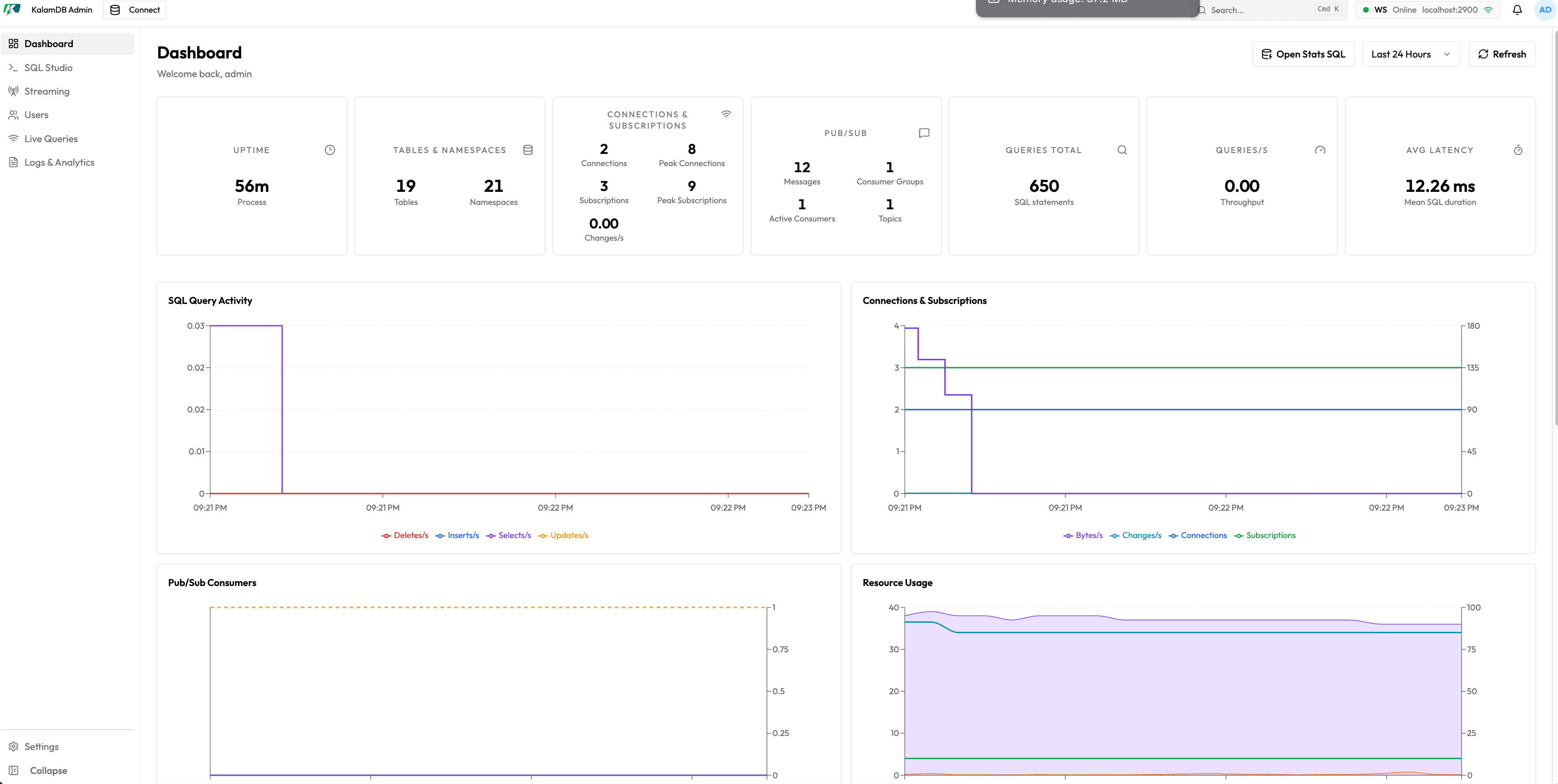
Use the dashboard before deeper inspection. It includes:
- session greeting and quick access to the statistics SQL view
- time-range selector and manual refresh
- summary cards for uptime, tables, namespaces, connections, subscriptions, pub/sub, total queries, query rate, and average latency
- charts for SQL query activity, connections and subscriptions, pub/sub consumers, resource usage, and manifest/parquet rates
- slow query table with timestamp, SQL statement, duration, priority, and pagination
- storage usage card with backend selector, used/free capacity, path, usage percentage, and health
- cluster node health with node count, leader status, active/joining state, memory, CPU, uptime, and replication lag
When To Use It
Start here when you need to decide where to drill in next: SQL Studio for query behavior, Live Queries for subscription pressure, Streaming for topics and consumers, Logs & Analytics for slow queries and jobs, or Settings for runtime configuration.